TLDR
- Lore is the open source (MIT) version control system from Epic Games, written in Rust. It is pre-1.0 (0.10.0 shipped on September 17, 2026) and moving fast, so commands, APIs and formats can still change.
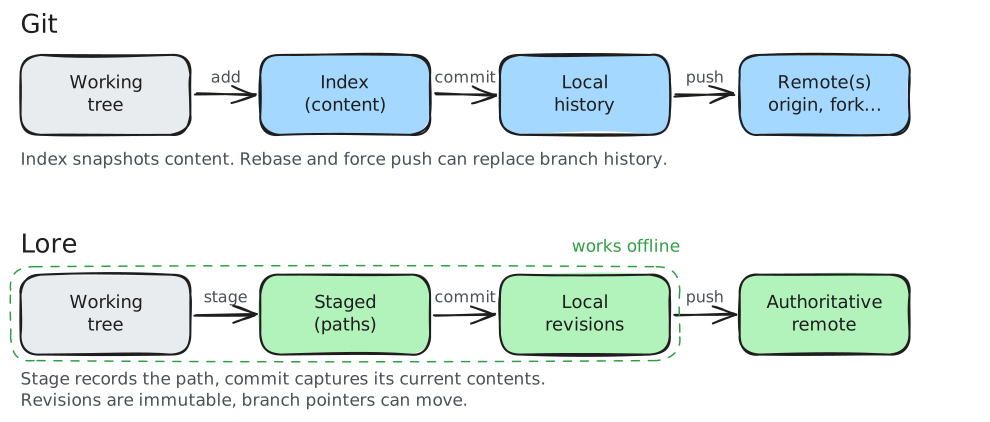
- Think of it as Git-like local ergonomics with a centralized, authoritative remote. You can commit, branch and diff offline. The remote decides the real state of every branch.
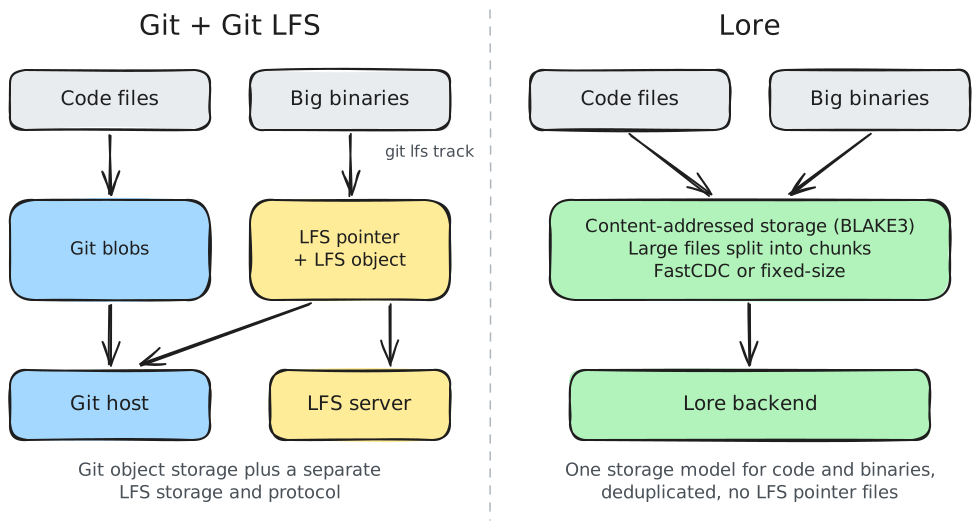
- Binaries are first class. There is no LFS layer: text and binary files use the same content-addressed store (BLAKE3). Large files are split into chunks (content-defined FastCDC or fixed-size) and deduplicated.
- Revisions are immutable. An existing revision is never edited in place. Operations that reshape history create new revisions and move the branch pointer.
- Sparse working trees and lazy fetching are part of the core design, not an add-on.
Concept mapping
| Concept | Git / Git LFS | Lore |
|---|---|---|
| Where the real history lives | Distributed, many remotes | Centralized, authoritative remote iCommit, branch and diff work offline. Push when you reconnect. The remote can be several server processes, caches and replicas acting as one authority.Epic docs: remote, centralized with offline capability |
| Hidden folder with the local repo data | .git/ | .lore/ iHolds local state, including the view file at .lore/view.Epic docs: view filter |
| File listing paths to never track | .gitignore | .loreignore iAn outbound filter: keeps paths out of staging and commits.Only applies to new content, not files already tracked.Epic docs: ignore file, outbound filtering |
| How big binaries are handled | Git LFS pointers + LFS server | Nothing extra iBig files use the same store as code. Lore is binary-first: all content is an opaque byte stream, with no line-ending or encoding guesses.Epic docs: binary-first, what binary-first means |
| How file content is stored | Whole-file blobs, packfiles | Content-addressed store, large files chunked iEvery byte lives in an immutable store keyed by BLAKE3 hash. Files above a size threshold are split with FastCDC or fixed-size chunking. With content-defined chunks, small edits to big files only upload the changed chunks.Epic docs: chunking, two chunking strategies |
| ID for one saved state of the repo | Commit (SHA) | Revision (content hash, or branch-qualified number) iA revision has an immutable, content-derived hash. Within a branch it can also be addressed by a revision number such as main@42, or main@LATEST.Use the full 64-character hash. Short hash prefixes are refused since 0.10.0.Epic docs: revision, revision identifier |
| Choosing what goes in the next commit | Index snapshots file content | Staging pins the path iStaging records the intent to include a path. The commit captures the file contents at commit time, so later edits are included.Epic docs: stage, staging as recorded intent |
| Changing commits after they exist | Rebase, amend, force push | New revisions, never edits in place iRevisions are immutable. Rebase, cherry-pick and squash create new revisions and move the branch pointer. The originals stay in storage. Today the CLI exposes cherry-pick, revert and amend, but no rebase or squash command yet.Epic docs: rebase, cherry-pick and squash, immutable store, revision amend |
| Getting only part of a big repo | git sparse-checkout, partial clone | View files and file dependencies iSparse is the default: only the paths you ask for land on disk. Everything else is fetched lazily when needed. File dependencies sync a file plus what it needs.Epic docs: sparse working tree, view filter, file dependency |
| Including another repo inside this one | Submodules | Links iA link points at a specific revision and subtree of another repo, mounted at a path. It is recorded in the parent revision and has its own access control. Exists in the data model and CLI ( lore link), but Epic still lists the links and layers workflow as in progress.Epic docs: link, sub-repository links, roadmap |
| Workstation-only files over the repo | (none) | Layers iA local overlay of content from another repo, applied when files are written to disk. Not versioned and never sent with clones. Exists in the CLI ( lore layer), but Epic still lists the links and layers workflow as in progress.Epic docs: layer, layers, roadmap |
| Claiming a binary so nobody else edits it | git lfs lock | lore lock acquire iA server-recorded, exclusive claim on a file. Lore stops two people taking the same lock.The glossary and FAQ say the current implementation does not block a push without it. The design doc describes server-enforced locks, and scalable locking is on the roadmap.Epic docs: lock, FAQ: file locking, design: locks, roadmap |
| Blocking direct pushes to key branches | Branch protection (on the host) | lore branch protect iBuilt into the CLI instead of the hosting service.Epic docs: branch protect |
| Who can read or write what | Repo-level access on the host | Partitions iA partition is the access boundary in storage. Knowing a content hash is not enough to read data outside your partition. No built-in users or groups: identity comes from your own setup.Epic docs: partition, partitions |
Command mapping
| Git | Lore |
|---|---|
git init | lore repository create ilore repository create [url]Creates a repository in the current directory. With --offline the argument is just the repo name.Epic docs: lore repository create |
git clone <url> | lore clone <url> ilore clone <url> [path]Clones and materializes the working tree. --view <file> sets a view filter, --branch picks a branch.Epic docs: lore clone, view filter |
git status | lore status --scan ilore status [--scan]Shows the staged revision and files marked dirty. Without --scan it only reads dirty flags, so edits not yet marked (with lore dirty or a scan) do not show up.Epic docs: lore status |
git add <path> | lore stage <path> ilore stage <path> [--scan]On a directory it only stages files already marked dirty. Add --scan to find and stage changes in one pass.Epic docs: lore stage, stage |
git restore --staged <path> | lore file unstage <path> ilore file unstage <paths>Removes paths from the stage. Your edits stay on disk.Epic docs: lore file unstage |
git restore <path> | lore file reset <path> ilore file reset <paths> [--purge]Discards local changes back to the current revision. --purge also deletes untracked files.Epic docs: lore file reset |
git commit -m "msg" | lore commit "msg" ilore commit <MESSAGE>The message is a plain argument, not -m.Creates a local revision from the stage. Works offline.Epic docs: lore commit |
git push | lore push ilore push [branch]Sends local revisions to the remote and moves the branch. --fast-forward-merge lets the server fast-forward if the branch moved.Epic docs: lore push |
git pull | lore sync ilore sync [revision]Moves your working tree to a revision. Takes a full hash, main@42, main@LATEST or branch@hash.Short hash prefixes are refused since 0.10.0.Epic docs: lore sync, revision identifier |
git log | lore revision history ilore revision history [LENGTH]Lists revisions from the latest on the current branch. --branch picks another branch.Epic docs: lore revision history |
git log -- <path> | lore file history <path> ilore file history <PATH> [LENGTH]Lists the revisions that touched one file.Epic docs: lore file history |
git show <sha> | lore revision info <rev> ilore revision info [revision]Shows details for one revision. --delta adds what changed.Epic docs: lore revision info |
git diff a b | lore revision diff / lore file diff ilore revision diff <source> [--target <rev>]Diffs two revisions (target defaults to the current one). lore file diff <paths> diffs specific files.Epic docs: lore revision diff, lore file diff |
git branch | lore branch list ilore branch list [--archived]Lists branches. --archived includes archived ones.Epic docs: lore branch list |
git switch -c <name> | lore branch create <name> then lore branch switch <name> ilore branch create <branch>Creates a branch. Then lore branch switch <branch> to move onto it.branch switch --dry-run previews the file changes.Epic docs: lore branch create, lore branch switch |
git merge <branch> | lore branch merge <branch> ilore branch merge <branch>Merges another branch into your current one. On conflicts use merge resolve, restart or abort.Epic docs: lore branch merge |
| (checkout target, merge, switch back) | lore branch merge into <target> "msg" ilore branch merge into <target> <MESSAGE>Merges your current branch into the target without switching to it. Needs a commit message.Epic docs: lore branch merge into |
git cherry-pick | lore revision cherry-pick ilore revision cherry-pick <revision>Applies one revision onto the currently synced revision. Has resolve, restart and abort for conflicts.Epic docs: lore revision cherry-pick |
git revert | lore revision revert ilore revision revert <revision>Creates a new revision that undoes the given one.Epic docs: lore revision revert |
git lfs lock / unlock | lore lock acquire / lore lock release ilore lock acquire <paths> / lore lock release <paths>Takes or drops an exclusive claim on files. --branch names the branch the lock is tied to. Locking is advisory today, and scalable, branch-aware enforcement is still being developed.Epic docs: lore lock acquire, lore lock release, lock, branch-aware locking |
git lfs locks | lore lock status / lore lock query ilore lock status [paths]Shows locks on specific files. lore lock query --owner <id> or --path searches locks by owner, branch or path.Epic docs: lore lock status, lore lock query |
git gc | lore repository gc ilore repository gcRuns a full garbage collection on the local store.Epic docs: lore repository gc |
git fsck | lore repository verify ilore repository verify [--heal]Checks local repository state for consistency. --heal tries to repair it.Epic docs: lore repository verify |
git filter-repo (purge a file from history) | No direct equivalent. lore file obliterate deletes the stored content but does not rewrite the revisions that point to it ilore file obliterate --path <PATH> (or --address)Deletes the stored bytes but keeps their address. Revisions that pointed to it stay valid and read back a clear absence.Epic docs: lore file obliterate, obliteration |
git stash | No documented equivalent yet |
Check lore <command> --help before relying on exact flags. The CLI reference is the source of truth.
Workflow side by side
What changes in your head
- No question about who has the real repo. The remote is the authority. Your local commits are a draft until you push.
- Stop fighting LFS. No
.gitattributestracking rules, no pointer files, no broken clones from forgetting to install LFS. - Revisions are immutable, just like Git commits. History-editing operations create new revisions and move branch pointers rather than modifying existing revisions in place.
- Staging includes a path, it does not freeze the exact content. If you edit after staging, the commit gets the newer version.
Numbers: Anchorpoint benchmark, Lore 0.8.3
The Anchorpoint benchmark (Lore 0.8.3, Git 2.54 with LFS 3.7.1 on Gitea, UE 5.8 source: 392,559 files, 63.5 GB):
| Lore | Git LFS | |
|---|---|---|
| Initial add + commit + push | 5.3 min | 1 h 6 min |
| Fresh clone | 1,221 s | 1,761 s |
| Server storage | 22 GB | 57 GB |
One benchmark on one dataset, run on Lore 0.8.3. Lore has shipped several releases since, so treat it as a signal, not a verdict.