TLDR
- Lore is the open source (MIT) version control system from Epic Games, written in Rust. It is pre-1.0 (0.10.0 shipped on September 17, 2026) and moving fast, so commands, APIs and formats can still change.
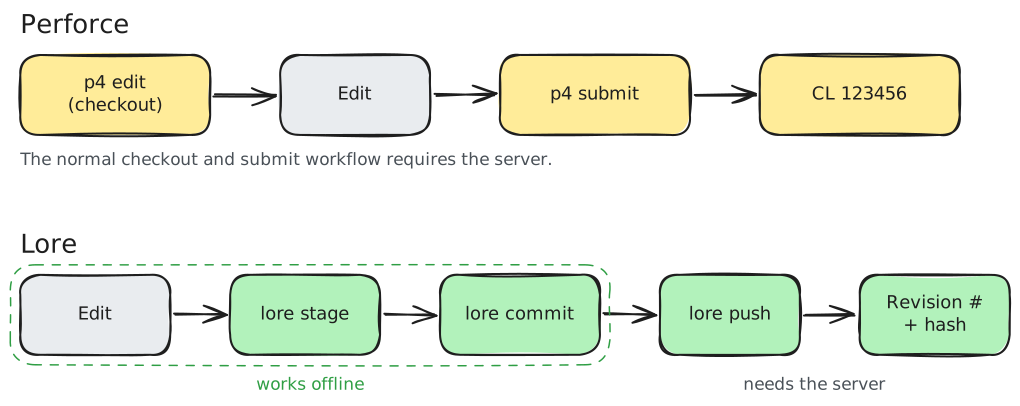
- Like Perforce, it is centralized and built for huge binary-heavy repos. Unlike Perforce, it works offline: commit, branch and diff locally, then push.
- No per-seat license. You run and pay for the server and storage yourself.
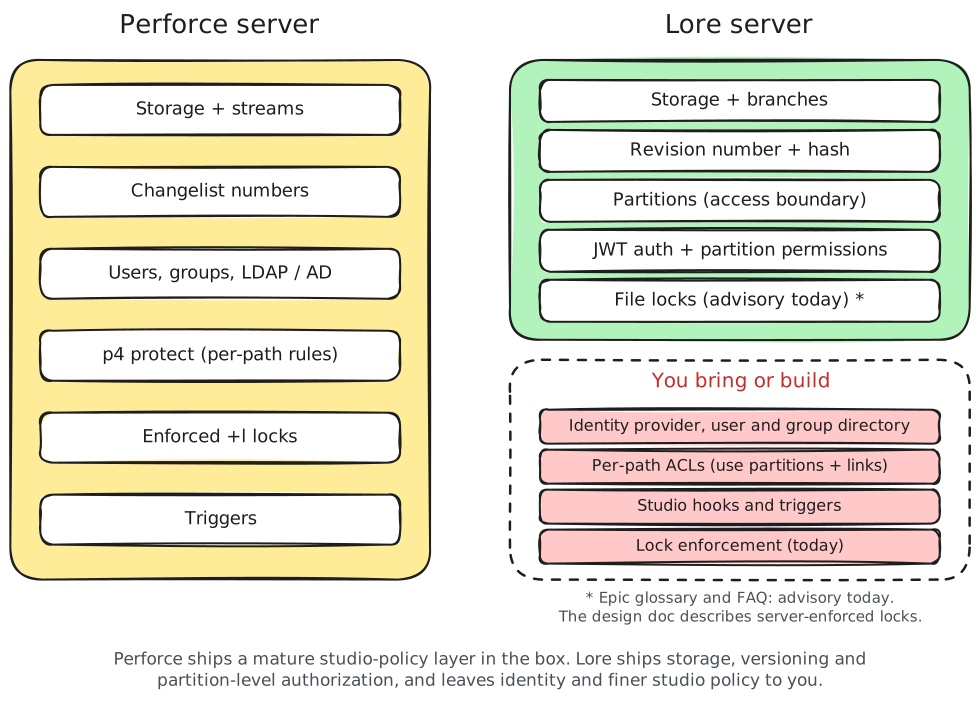
- The big gaps today: locks are advisory in the current implementation, and there is no built-in studio identity or group management and no per-path permissions. Lore can authenticate against an external identity provider and authorize per repository (partition). Finer path-level policy is modeled with repository boundaries and links.
Concept mapping
| Concept | Perforce | Lore |
|---|---|---|
| The server that holds the truth | P4 server (p4d) | Lore remote iBoth are the single source of truth. A Lore remote can be several server processes, caches and replicas acting as one authority.Epic docs: remote, centralized with offline capability |
| Working without a connection | Must be online to submit | Offline commits iStage, commit, branch and diff locally. Push when you reconnect.Epic docs: remote, centralized with offline capability |
| ID for one submitted change | Changelist number | Revision (content hash, or branch-qualified number) iA revision has an immutable, content-derived hash. Within a branch it can also be addressed by a revision number such as main@42, or main@LATEST.Use the full 64-character hash. Short hash prefixes are refused since 0.10.0. Not the same as a changelist number: it counts along one branch, not across the whole server.Epic docs: revision, revision identifier, revision state |
| Work you have not submitted yet | Pending changelists | Staged revision iOne staged set, not multiple numbered pending lists. Staging records paths. The commit captures the file contents at commit time.Epic docs: stage, staging as recorded intent |
| Parking work on the server without submitting | Shelves | No documented equivalent yet |
| Choosing which files land on your disk | Workspace / client spec view | View files i.lore/view decides which repository paths are materialized in the working tree..loreignore is separate: it keeps paths out of staging and commits.Epic docs: view filter, view files, ignore file |
| Syncing a file with what it needs | (manual) | File dependencies iSync a file plus everything it depends on.Epic docs: file dependency |
| Parallel lines of development | Streams, depot branches | Branches iCheap branches with a stable ID behind each name, so renames are safe.Epic docs: branch, identity vs name |
| Pulling in content from another depot | Import streams / remote depots | Links iMount a specific revision and subtree of another repo at a path. It has its own access control. Exists in the data model and CLI ( lore link), but Epic still lists the links and layers workflow as in progress.Epic docs: link, sub-repository links, roadmap |
| Workstation-only files over the repo | (none) | Layers iLocal, unversioned overlays per workstation. Never sent with clones. Exists in the CLI ( lore layer), but Epic still lists the links and layers workflow as in progress.Epic docs: layer, layers, roadmap |
| Telling the system you will edit a file | p4 edit checkout before editing | Nothing iJust edit. Lore treats the filesystem as the ground truth and detects changes.Epic docs: filesystem as ground truth |
| Claiming a binary so nobody else edits it | +l exclusive lock (enforced) | lore lock acquire (advisory today) iLore stops two people taking the same lock.The glossary and FAQ say the current implementation does not block an edit or push without it. The design doc describes server-enforced locks, and scalable locking is on the roadmap.Epic docs: lock, FAQ: file locking, design: locks, roadmap |
| Who can read or write which paths | p4 protect path permissions | Partitions + links iA partition is the access boundary. By design there are no per-path rules inside one. To restrict a subtree, make it its own repo and mount it with a link. Each link is a point where access can change.Epic docs: partition, partitions, per-directory access |
| Who the users are | Users, groups, LDAP / AD | Your identity provider iLore does authenticate: the server checks JWT tokens (OIDC-style) that carry a user, an expiry and per-partition permissions (read, write, obliterate, admin). Recent releases add a server-side interface for looking up users, but the identity system and group management stay external.Epic docs: JWT, authentication, authorization scope, release notes |
| How file content is stored | Full file revisions, RCS deltas | Content-addressed store, large files chunked iFiles above a size threshold are split with FastCDC or fixed-size chunking. Deduplicated across files, branches and history.Epic docs: chunking, two chunking strategies |
| Permanently purging a file | p4 obliterate | lore file obliterate iNot identical. Lore deletes the stored content but keeps the revisions that point to it.Reading it returns a clear absence instead of the bytes.Epic docs: obliteration, file obliterate |
| Server-side hooks on submit | Triggers | Build your own iNo Perforce-style trigger system yet. Plan for this if you rely on submit triggers. Client and server-side hooks are on the roadmap.Epic docs: roadmap |
Command mapping
| Perforce | Lore |
|---|---|
| Create depot + workspace | lore repository create ilore repository create [url]Creates a repository in the current directory. With --offline the argument is just the repo name.Epic docs: lore repository create |
p4 client + p4 sync (first time) | lore clone <url> ilore clone <url> [path]Clones and materializes the working tree. --view <file> sets a view filter, --branch picks a branch.Epic docs: lore clone, view filter |
p4 sync | lore sync ilore sync [revision]Moves your working tree to a revision. Takes a full hash, main@42, main@LATEST or branch@hash.Short hash prefixes are refused since 0.10.0.Epic docs: lore sync, revision identifier |
p4 opened, p4 status | lore status ilore status [--scan]Shows the staged revision and files marked dirty. Without --scan it only reads dirty flags, so edits not yet marked (with lore dirty or a scan) do not show up.Epic docs: lore status |
p4 reconcile | lore status --scan then lore stage <path> ilore stage <path> [--scan]On a directory it only stages files already marked dirty. Add --scan to find and stage changes in one pass.Epic docs: lore stage, stage |
p4 add / p4 edit / p4 delete | lore stage <path> ilore stage <path> [--scan]On a directory it only stages files already marked dirty. Add --scan to find and stage changes in one pass.Epic docs: lore stage, stage |
p4 revert <file> | lore file reset <path> (or lore file unstage to keep the edit) ilore file reset <paths> [--purge]Discards local changes back to the current revision. --purge also deletes untracked files.Epic docs: lore file reset |
p4 submit -d "msg" | lore commit "msg" then lore push ilore commit <MESSAGE>The message is a plain argument, not -m.Creates a local revision from the stage. Works offline.Epic docs: lore commit |
p4 changes | lore revision history ilore revision history [LENGTH]Lists revisions from the latest on the current branch. --branch picks another branch.Epic docs: lore revision history |
p4 filelog <file> | lore file history <path> ilore file history <PATH> [LENGTH]Lists the revisions that touched one file.Epic docs: lore file history |
p4 describe <cl> | lore revision info <rev> (for example main@42) ilore revision info [revision]Shows details for one revision. --delta adds what changed.Epic docs: lore revision info |
p4 diff2 | lore revision diff / lore file diff ilore revision diff <source> [--target <rev>]Diffs two revisions (target defaults to the current one). lore file diff <paths> diffs specific files.Epic docs: lore revision diff, lore file diff |
p4 streams | lore branch list ilore branch list [--archived]Lists branches. --archived includes archived ones.Epic docs: lore branch list |
p4 switch -c / new stream | lore branch create <name> then lore branch switch <name> ilore branch create <branch>Creates a branch. Then lore branch switch <branch> to move onto it.branch switch --dry-run previews the file changes.Epic docs: lore branch create, lore branch switch |
p4 merge / p4 integrate + p4 resolve | lore branch merge <branch> ilore branch merge <branch>Merges another branch into your current one. On conflicts use merge resolve, restart or abort.Epic docs: lore branch merge |
p4 copy up to parent | lore branch merge into <target> "msg" ilore branch merge into <target> <MESSAGE>Merges your current branch into the target without switching to it. Needs a commit message.Epic docs: lore branch merge into |
p4 undo | lore revision revert ilore revision revert <revision>Creates a new revision that undoes the given one.Epic docs: lore revision revert |
| Cherry-pick integrate of one CL | lore revision cherry-pick ilore revision cherry-pick <revision>Applies one revision onto the currently synced revision. Has resolve, restart and abort for conflicts.Epic docs: lore revision cherry-pick |
p4 lock / +l checkout | lore lock acquire <path> ilore lock acquire <paths> / lore lock release <paths>Takes or drops an exclusive claim on files. --branch names the branch the lock is tied to. Locking is advisory today, and scalable, branch-aware enforcement is still being developed.Epic docs: lore lock acquire, lore lock release, lock, branch-aware locking |
p4 unlock | lore lock release <path> ilore lock acquire <paths> / lore lock release <paths>Takes or drops an exclusive claim on files. --branch names the branch the lock is tied to. Locking is advisory today, and scalable, branch-aware enforcement is still being developed.Epic docs: lore lock acquire, lore lock release, lock, branch-aware locking |
p4 opened -a (who has what) | lore lock status / lore lock query ilore lock status [paths]Shows locks on specific files. lore lock query --owner <id> or --path searches locks by owner, branch or path.Epic docs: lore lock status, lore lock query |
p4 verify | lore repository verify ilore repository verify [--heal]Checks local repository state for consistency. --heal tries to repair it.Epic docs: lore repository verify |
p4 obliterate | lore file obliterate ilore file obliterate --path <PATH> (or --address)Deletes the stored bytes but keeps their address. Revisions that pointed to it stay valid and read back a clear absence.Epic docs: lore file obliterate, obliteration |
p4 shelve / unshelve | No documented equivalent yet |
Check lore <command> --help before relying on exact flags. The CLI reference is the source of truth.
Submit side by side
What changes in your head
- Submit is two steps.
commitis local,pushmakes it real for everyone. - No checkout ceremony. Files are writable. The flip side is that today nothing stops an artist from editing a locked
.uasset, so treat locks as a team agreement until enforcement lands. - Revision identity works differently. A revision has a content-derived hash and a revision number that counts up along its branch (
main@42). It is not a server-wide changelist number, so build systems andFixed in CL 123456notes need to include the branch, or use the hash. - Identity moves out of the server. Lore checks JWT tokens and per-partition permissions, but the users and groups come from your identity provider. Access is per partition, so plan which subtrees need their own repo (mounted with a link) before you migrate.
Numbers: Anchorpoint benchmark, Lore 0.8.3
The Anchorpoint benchmark (Lore 0.8.3, Perforce 2026.1, UE 5.8 source: 392,559 files, 63.5 GB):
| Lore | Perforce | |
|---|---|---|
| Initial add + submit | 5.3 min | 1 h 23 min |
| Fresh sync | 1,221 s | 1,416 s |
| Server storage | 22 GB | 32 GB |
One benchmark on one dataset, run on Lore 0.8.3. Lore has shipped several releases since, so treat it as a signal, not a verdict.
Should you switch?
- Indie or new project, comfortable running infra: worth trying now.
- Studio that depends on enforced locks, per-path
p4 protectrules, triggers and P4V for artists: wait, or budget for building those layers yourself.